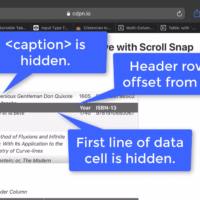
Though JS-free fixed table row and column headers have been possible for quite some time, Safari’s and Chrome’s recent fixes got some people pretty excited. Enough that folks are copying code samples in whole, without always paying attention to necessary considerations. That same excited demo included other CSS properties that…
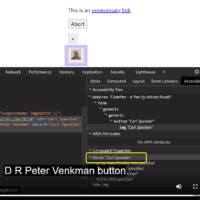
Many of my clients try to reduce the number of controls on a screen by replacing them with single controls that change their name based on their purpose (what they unironically call reducing complexity). For example, presenting a download button that also acts as its own progress indicator and completion…
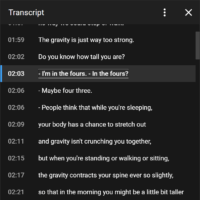
Let’s establish something first — auto-generated captions are a problem. They almost guarantee a WCAG failure and can leave users more confused (or offended) than when they started. YouTube creates the transcript from the closed captions of a video (the text that overlays the video, as opposed to burned-in or…
I have written a bunch about responsive tables. Maybe too much. I keep trying to give developers the information they need to make informed decisions — ARIA attributes, screen reader & browser pairing results, bugs, and so on. I have spread things out over years of posts. I have filed…
The title kind of says it all. WCAG 2.1 has been the standard for over two years — it was published in June 2018. If you rewind to when the Accessibility Guidelines Working Group (AGWG) was asking for feedback on its near-final 2.1 draft, many of the Success Criteria in…
WCAG 2.2 is live. Read the W3C’s What’s New in WCAG 2.2 to know what from this wildly outdated post made it into the final spec. The latest (and probably last) WCAG version 2 point release is in draft and the W3C is asking for comments and feedback by 18…
TL;DR: Regardless of what accessibility conformance level you target, do not arbitrarily open links in a new window or tab. If you are required to do so anyway, inform users in visible text. Overview Throughout this post I am going to use the terms browser window and tab interchangeably. While…
Since the early days of the web, when images could be floated and text would wrap around them, designers have wanted to bring drop caps onto the web. Then we learned how terrible a pattern like <img alt=”M” align=”left”>atthew is for users, and CSS introduced :first-letter, letting us believe all…
TL;DR: for standard HTML controls and standard ARIA patterns (widgets), you do not need to add instructions for screen readers on how to use them nor what they are. When a screen reader encounters an element on the page that invites interaction beyond reading, it typically provides users with instructions…
At Smashing Conference in New York on Tuesday, October 15, Microsoft is hosting a lunch session as part of its The Web We Want initiative. Developers are pitching their wants. I was invited to pitch my request, but since I will not be at the conference I was asked for…
The title of this post is a play on Jason Grigsby’s recent post An HTML attribute potentially worth $4.4M to Chipotle. In it he asks: How many other people have failed to finish an order because the form doesn’t support autofill and the error messages aren’t helpful? An HTML attribute…
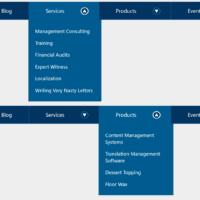
10 July 2026: I encourage you to read Link + Popover Navigation instead. It uses the new HTML popover feature and CSS anchor positioning to create the same outcome without script and with less ARIA. Obviously you’ll need to decide if you audience is using browsers that support these features…