Your Browser Can Already Speak a Page
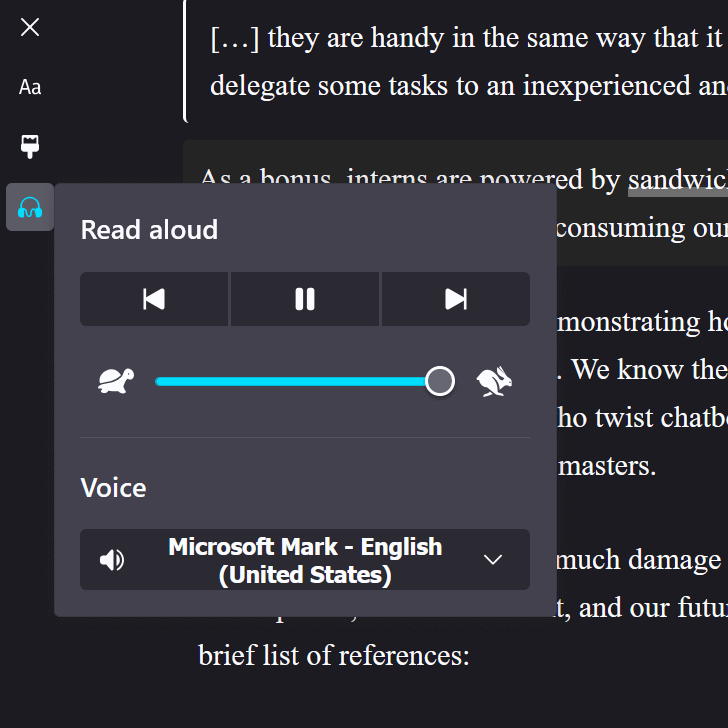
Is an “AI” company offering to provide spoken versions of your pages for users? Is an overlay company promising to make your content more accessible by its overlay speaking it? Is some other vendor pitching you on some kind of thing that reads your web pages aloud to users?
You don’t need it.
Or, rather, your users may not need it. Their browser already offers it. At no cost to you. Nor them.
No Really, Try It
These features may not appear for pages that are not well-formed (lack a main region, are nothing but div-soup, etc.). If they don’t appear for your content, that’s a signal that you may have work to do on the underlying HTML. Any fixes you make would likely result in a better experience for everyone.
Instructions for common browsers:
- Firefox:
- for Firefox on desktop, you can enter reader view (F9) and then activate the headphone / “Read aloud” button (N).
- for Firefox on Android, you can use Android’s read aloud feature. Select some text, from the context menu choose “More”, and then choose “Read aloud.” I suggest entering Firefox’s reader mode, choosing “Select all” from the context menu, and then “Read aloud.”
- Chrome:
- in Chrome desktop, right-click, choose “Open in reading mode”, and then hit the play button (K).
- in Chrome mobile, activate the “More” kebab, then choose “Listen to this page.”
- Edge:
- Edge on desktop offers the Read Aloud feature (Ctrl + Shift + U).
- Edge on mobile uses the immersive reader, where you can choose “Read aloud” from the toolbar.
- Safari:
- on iDevice Safari, activate the “Page menu” button (the double-underlined rectangle on the left of the address bar) and choose “Listen to Page.”
- on macOS Safari, choose “Edit” from the menu bar, then “Speech,” then “Start Speaking.”
In most cases, users can choose the reading speed and voice, pause or restart it, and even jump back and forth through paragraphs. This is more control than third-party products offer.
But Also
If an “AI” company offered on-demand or pre-recorded audio, they’re leveling up our overall destruction of the environment.
If an overlay vendor offered it through its overlay, you’re adding legal risk, trusting them to not be liars, letting them track your users, and assuming it will work. Because, as I’ve documented extensively, overlays don’t work (sometimes at all but usually as advertised).
Any other vendor is probably a mix of data harvester, crypto miner, scam platform, or government panopticon node.
Users who most benefit from a page being spoken to them know about browsers’ built-in features. Those users may rely on extensions for even more control. They are unlikely to benefit from (or care about) these third-party offerings.
However
If you have good research, not provided by the vendor, that your specific users are asking for this specific feature then sure. Go for it. But also track its use and understand you’re taking on the vendor’s risks as your own — for those users whose blockers don’t block it.
2 Comments
“Any other vendor is probably a mix of data harvester, crypto miner, scam platform, or government panopticon node.” Tell us what you really think, Adrian! LOL
I have a differing view. I think a lot of browser TTS is of poor quality, or is unreliable.
I dislike the very robotic-sounding voices of a lot of TTS systems. Edge’s might be a bit better, but it’s remote AI generation, I suspect. If I want to sit down and listen to an entire blog post, speech quality matters a lot to me.
When implemented well, I don’t think it harms anyone to have an audio version available. It’s a convenience. I must emphasise the “when implemented well” part…
The amount of computation required by a TTS AI model is fairly minimal. They’re fairly compact compared to most general LLMs. Open weight models like kokoro sound amazing – they’re very human-like, with far more clarity than older methods of speech synthesis.
Part of the appeal of AI speech synthesis, at least for me, is the speech quality is leagues ahead. I want it to sound like a high-quality podcast, not a janky approximation of human speech.
I’ve done a lot of work in this area, around AI speech on the web. On my blog I’ve developed an automated AI speech synthesis process – a local kokoro model runs at build-time and it only takes 30 seconds or so on an Apple M3 – so very minimal electricity use.
Having my own local AI model process enabled me to do cool things, like custom IPA to correct pronunciations of words, and even helping it to correctly speak words in languages it never trained on, by intervening at the G2P (grapheme-to-phoneme) layer.
You don’t have to pay an AI vendor to run AI – Hugging Face has free, local options You do have to be a bit of a nerd, though.
Leave a Comment or Response